Burst mode, where your camera keeps taking photos as long as you hold down the shutter button, is handy when you’re trying to take action, sports, wildlife, or any other kind of photos where the subject is moving quickly. There’s a knack to doing it right, so let’s dig in.
Previsualize Your Image
When you’re using burst mode, you don’t have a lot of time to think about the photo as you take it. Instead, you have to do all your thinking before the shot. You need to consider everything from your camera settings to how you want to compose the final image.
Start by visualizing how you want the final image to look (in photography this is called previsualizing) and then start making the necessary decisions. Some of the most important things to think about are:
- What do you want the background to look like? Blurry and out of focus? With a particular object in it? Where do you need to stand, what focal length do you need to use, and what should your aperture be to achieve it?
- How are you going to show the action? Through freezing everything in a split second or with motion blur? That will decide your shutter speed and ISO. It will also determine what shooting mode to use.
In the sequence of shots below, I knew I wanted my friend Will to kick up a spray of snow and have the mountain in the background. I skied down first and got into position so he could get up some speed. Since I wanted the background in focus, I needed to use a narrow aperture and a fast shutter speed. It was a sunny day, so a 17mm lens with aperture priority mode set to f/8 and an ISO of 200 took care of that.
Once he started skiing, it was too late for me to change anything, which is why it’s essential that you make sure you’re in the right position and have your settings dialed in first.
Use the Right Focus Mode
Getting focus right is one of the big secrets to shooting photos in burst mode. Beginners often miss focus entirely, or their camera is in the wrong mode, so it locks focus for the first shot and then either stays focused on the (now wrong) spot or slows down the burst while searching for a new focus spot. There are a few ways to solve these issues.
The best way to focus for bursts is actually to prefocus on the spot where you expect the subject to be and then switch to manual focus mode. This way, autofocus can’t get in your way at all. That’s what I did in these photos of my friend Jeremy dropping off a cliff.
Unfortunately, this technique only works if the subject is moving horizontally across the frame and so staying in the same plane of focus. If the subject is moving toward or away from you at all, you’ll need to use autofocus.
- Single Autofocus (One-Shot AF on Canon and AF-S on Nikon), which finds focus once and then stays locked.
- Continuous Autofocus (AI Servo on Canon and AF-C on Nikon), which continually tracks moving objects.
- Hybrid Autofocus (AI Focus on Canon and AF-A on Nikon), which combines the two; if a subject moves your camera will track it, but it will try to stay locked.
For burst photography, you pretty much need to use continuous autofocus. The other modes are likely to cause you problems.
Even within continuous autofocus, your camera may give you more options buried in the menu. With my camera, I can choose from different modes based on what kind of moving target I’m tracking. Dig in, and see if your camera lets you choose between consistent or erratic subjects and then pick the most appropriate for your subject.
One final consideration for focus is aperture. Sometimes you’ll need to sue a set aperture for creative reasons, but if you can, it’s better to use a slightly narrower aperture. Using an aperture around f/8 is perfect; the extra depth of field means that even if your camera misses focus slightly, your subject will probably still be sharp.
Use the Right Burst Mode
Your camera can’t shoot bursts forever. Normally, unless you’ve got a dedicated sports camera, you get about three or four seconds of continuous shooting before your camera slows down. There are ways around this.
If you need a really fast burst for a short period, use the normal high-speed burst mode. It will give you the best chance at getting the shot you want.
On the other hand, if you need a longer burst mode, see if your camera has a low-speed continuous mode. A lot of cameras have one that’s around three frames per second (FPS) that can go for a lot longer than the high-speed mode.
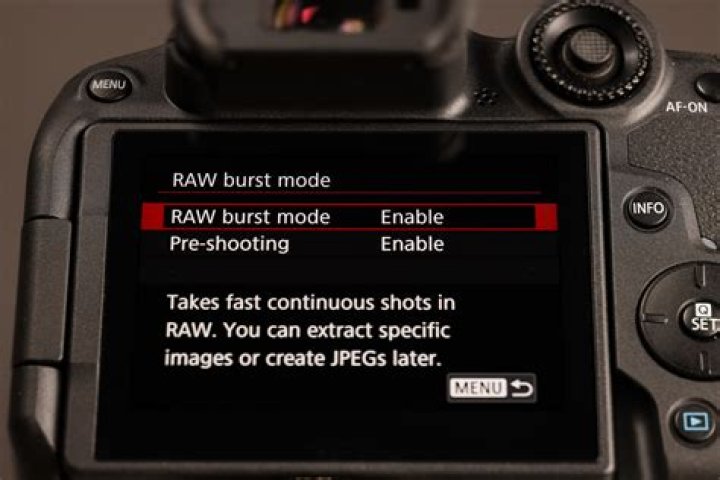
The final option if you need a long high-speed burst is to drop the quality of your images. We recommend you shoot RAW photos, but in a pinch, you can switch to JPEG. This will give you a longer high-speed burst at the expense of image data.
Anticipate and Take the Shot
With everything set up, it’s finally time to take the shot. A lot’s got to happen in a short space of time, so here’s what you need to do:
- Start tracking your subject through your lens before you plan to start shooting. You want to have a feel for the speed and direction they’re moving so you can anticipate what’s going to happen.
- Try to lead your subject slightly. Action images are stronger when the subject appears to be moving into the frame than out of it. This means you want more space in the image ahead of the subject than behind them.
- As the subject approaches, press the shutter button. Make sure you do it before they get to the spot you want them in the final image. It’s better to waste a shot or two before the action than miss it.
- Keep shooting until the action finishes or your burst mode slows to a crawl.
If all has gone well, one of your frames will be the shot you’re looking for.
Do It Again
Consistently getting good photos with burst mode takes practice, so keep doing it. In this article, I’ve been focusing on slightly staged sports shots, but all the advice is the same regardless of whether you’re shooting models whipping their hair back or a soccer game. The difference is the results of your decisions, rather than what decisions need to made and the time frame you have to make them.
Burst mode is a great way to guarantee you get any action shot—but, as of iOS 14, it’s slightly hidden on the iPhone XS, iPhone XR, and newer devices. Here’s how to use it on a modern iPhone.
Taking Photos and Videos With QuickTake
QuickTake is a new feature that makes it easier to capture short videos while you shoot photos on your iPhone. It makes the camera app work more like the built-in cameras in apps like Instagram and Snapchat.
To capture a short video, hold down the “Shutter” button. When you release it, the recording will stop. If you want to record a longer video, hold down the “Shutter” button and drag it to the padlock on the right. This will lock the recording until you tap the “Stop Recording” button. You can keep taking photos by tapping the “Shutter” button even as you record.
If you’ve used an iPhone for a while, you might notice this is how you used to shoot bursts. Now, to shoot a burst of photos, hold the “Shutter” button and drag it to the left. Your iPhone will keep shooting until you release it.
You have to drag the shutter quite quickly; pause too long and your iPhone will start recording video.
If, like me, you like shooting in burst mode, it takes a little bit of getting used to. But there’s a better way.
Set Volume Up to Burst Mode
The volume buttons on your iPhone double as a shutter release and work with QuickTake. Tap “Volume Up” or “Volume Down” to take a photo, hold them down to shoot a short video.
However, you can configure your iPhone so that holding “Volume Up” instead shoots a burst of photos, while holding “Volume Down” still shoots video. It’s a great way to have total control of your camera.
To enable it, go to Settings > Camera, and enable “Use Volume Up For Burst.”
Selecting Photos from a Burst
Not every photo you shoot in a burst will be good. In fact, you probably only want to keep one or two. Your iPhone will automatically select what it thinks is the best photo but you should still go through them yourself.
To sort photos from a burst, open the Camera Roll. Bursts appear as a little stack of photos, although it’s quite hard to see. Tap in and you’ll also see “Burst (X photos)” in the top left.
Tap “Select,” and swipe through the collected photos tapping each one you want to keep. Then tap “Done.” You have the option to either “Keep Everything” or “Keep Only X Favorites.”
Choose the option that best applies. In either case, the photos you selected will be pulled from the burst and appear as individual photos in your Camera Roll ready to be edited, shared, or ignored forever.
(Confusingly, they don’t get added to your Favorites album. To do that, you’ll need to re-favorite them by tapping the Heart icon.)